
Why Your Business Is Not Showing on Google Maps
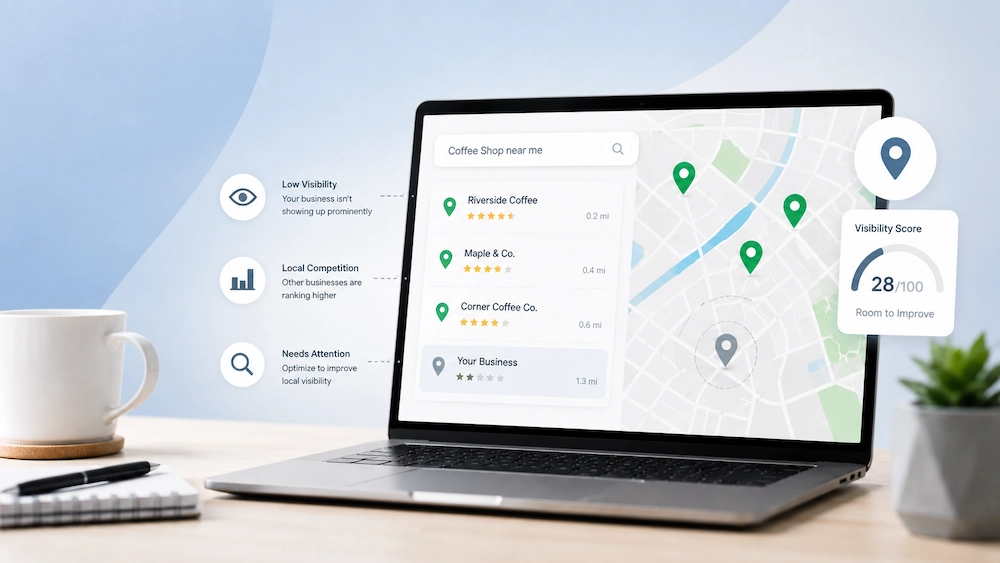
TL;DR: If your business is not showing on Google Maps, the issue is usually tied to your Google Business Profile, website, reviews, or local SEO signals rather than Google ignoring your business. Identifying and fixing these visibility barriers can significantly improve your chances of appearing in local search results and attracting more customers.
Key Takeaways
- Google Maps rankings rely on relevance, proximity, and trust signals like reviews and profile quality.
- A verified, optimized Google Business Profile improves local visibility.
- Your website should support your profile with consistent business and location information.
- Regular updates and authentic reviews help maintain and improve rankings.
Your business may be open, serving customers, and doing great work, yet still struggle to appear on Google Maps. That can be frustrating because many people use Google Maps to find local businesses, compare options, read reviews, and decide who to contact.
If your business is not showing up where you expect, there is usually a clear reason. The good news is that most local visibility issues can be identified and fixed with the right approach.
Why Google Maps Rankings Matter
Google Maps is one of the best ways to reach people who are already searching for businesses like yours nearby. If your profile is incomplete or doesn’t give Google enough information to trust and understand your business, competitors can easily show up ahead of you.
Not showing up does not always mean Google is ignoring your business. In many cases, Google simply lacks enough information or confidence to rank your profile for important searches.
Missing Verification
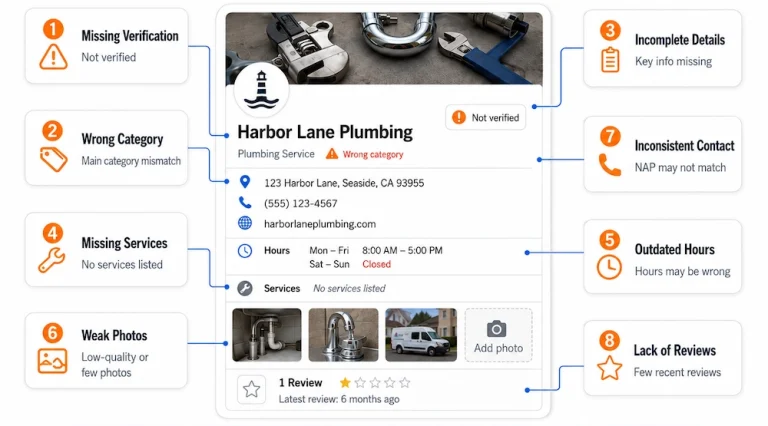
One of the first things to check is whether your Google Business Profile is verified, as this tells Google that your business is legitimate and can improve your chances of appearing in local search results. Many businesses overlook this step because a profile can still appear on Google Maps without full verification, but limited visibility is often the result.
What to Do
- Sign in to the Google account connected to your business and check your profile status.
- Complete any verification method Google requests, such as video, phone, or email verification.
- Before submitting, make sure your business name, address, phone number, website, and category are accurate.
Incorrect information can delay verification or cause additional issues later.
Incomplete Business Details
Google relies on your Business Profile to understand your business and show it in relevant local searches. If key details are missing—like hours, services, photos, contact information, or service areas—it becomes harder for customers to find you. A complete, accurate profile builds trust and improves your chances of appearing locally.
What to Do
Complete key profile sections with accurate information, including:
- Primary and secondary categories
- Services
- Operating hours
- Photos
- Business description
Wrong Business Category
Your primary category is one of the most important elements of your Google Business Profile because it helps Google understand what your business does and match it to relevant searches. If your category is too broad or does not accurately reflect your main service, your profile may appear for less relevant searches and miss opportunities to attract qualified local customers.
What to Do
- Select the category that best represents your main service instead of trying to cover everything you offer.
- Add secondary categories for related services when relevant.
- Review top-ranking competitors to see how Google classifies businesses in your industry.
- Use their categories as a reference, but avoid copying them exactly.
Distance From Searchers
Location plays a big role in Google Maps rankings. Your business might show up for people nearby but not for those searching from farther away. Google aims to display the most relevant local options, so even a well-optimized profile can have limited visibility if it’s outside the searcher’s area.
What to Do
Focus on the locations that matter most to your business rather than trying to rank everywhere. Building strong local relevance in key service areas is usually more effective.
- Create location-focused pages targeting key cities or service areas.
- Earn reviews from customers in your target markets.
- Clearly define your service coverage across your Google Business Profile, website, and listings.
- Publish local content that addresses customer needs and questions.
If you’re struggling to improve your local visibility, investing in professional affordable local SEO services can help strengthen your presence in the areas where your ideal customers are searching.
Profile Suspension Issues
If your business disappears from Google Maps, a suspension may be the cause. Google can restrict profiles that violate guidelines, intentionally or not. Common triggers include inaccurate information, duplicate listings, keyword-stuffed names, unsupported addresses, or suspicious changes. A suspension can significantly reduce visibility and prevent potential customers from finding your business.
What to Do
Avoid creating a new profile while the issue is unresolved because that can complicate the situation further. Instead, review your listing carefully and identify any potential guideline violations.
Gather supporting documents such as business registrations, licenses, utility bills, or tax records that match your profile information. These documents can help support an appeal if one is required.
Keyword-Stuffed Business Names
Some businesses try to improve their rankings by stuffing extra keywords into their business name, but while it may seem effective at first, it goes against Google’s guidelines and can cause visibility issues later on. The safest and most sustainable approach is to use your real business name and keep your information accurate, helping build trust with both Google and potential customers.
What to Do
Use the business name that customers see on your signage, legal documents, and branding materials. Consistency helps build trust with both Google and potential customers.
Do:
- Use your official business name exactly as it appears on signage and legal documents.
- Keep your business name consistent across your website, directories, and social media profiles.
- Ensure your branding matches the name displayed on your Google Business Profile.
Avoid:
- Adding extra service keywords that are not part of your official business name.
- Including city names solely for ranking purposes.
- Using promotional or marketing phrases that do not belong in your registered business name.
Weak Website Signals
Your Google Business Profile is important for local SEO, but Google also relies on your website to understand your services, location, and relevance to local searches. A well-structured website with clear service, location, and contact information supports your profile, strengthens local visibility, and improves your chances of being found by nearby customers.
What to Do
- Create dedicated pages for key services and target locations.
- Display clear contact details and service area information.
- Answer common customer questions through helpful content.
- Check technical essentials such as mobile usability, page speed, indexing, metadata, and structured data.
Lack of Reviews
Reviews play a big role in how customers choose a business and how visible that business becomes in local search results. Businesses with consistent, positive reviews tend to appear more trustworthy and credible because customers often check ratings and recent feedback before deciding who to contact.
In competitive markets, having only a handful of reviews can make it harder to stand out. Instead of chasing large numbers quickly, focus on encouraging a steady stream of authentic reviews from real customers to build trust and strengthen your local visibility over time.
What to Do
Ask satisfied customers for reviews after successful interactions such as appointments, purchases, consultations, or completed projects. Timing often makes a significant difference.
Respond to reviews professionally and respectfully, including negative feedback. Thoughtful responses show that your business values customer experience.
Outranked by Competitors
Sometimes your business appears on Google Maps but not prominently enough for potential customers to find it, often because competitors have stronger local SEO signals and rank higher for relevant service searches. Improving your visibility requires strengthening your Google Business Profile, website, reviews, citations, and overall online presence to build trust and relevance over time.
What to Do
Identify the keywords and locations that matter most to your business and compare your presence against top-ranking competitors. This comparison often reveals opportunities for improvement.
Review factors such as categories, reviews, website quality, backlinks, citations, and content depth. Understanding the gap helps guide your next steps.
Why Businesses Choose Keyforge SEO
Keyforge SEO helps businesses improve visibility on Google Maps, local search, and organic search, focusing on qualified enquiries rather than rankings alone. We assess your Google Business Profile, website, citations, content, technical SEO, and conversion opportunities to identify what is limiting your visibility and develop a strategy that supports your business goals.
As an all-Filipino SEO team serving local and international clients, we provide cost-effective, high-quality SEO solutions. Whether your business is in the Philippines or abroad, we can identify the causes of poor Google Maps visibility and create a plan to strengthen your local search presence.
Ready to Improve Your Visibility?
If your business is not showing on Google Maps, guessing the cause can waste valuable time and lead to costly mistakes. Keyforge SEO can assess your Google Business Profile, website, local signals, and competitive landscape to identify what is holding your business back.